
Introduction
Installing a float switch correctly is essential for ensuring reliable liquid level control in tanks, reservoirs, and pumping systems. A poorly installed float switch can cause pump failure, dry running, or overflow – leading to costly downtime and potential environmental risks.
In this guide, we explain step-by-step how to install a float switch, common mistakes to avoid, and tips to maximise the service life of your equipment.
Tools and Materials You’ll Need
Before starting, prepare the following:
- Float switch unit (e.g. Flygt ENM-10 liquid level regulator)
- Pump or control panel connection
- Mounting accessories (cable holder or weight)
- Electrical tools (screwdriver, pliers, insulation tape)
- Personal protective equipment (gloves, safety glasses)
Step-by-Step Float Switch Installation
Step 1: Plan the Installation
- Identify the application – water tank, sump, sewage pit, or industrial reservoir.
- Determine the start and stop levels for your pump.
- If multiple pumps are used, you may need more than one float switch (e.g. one for stop, one for start, and another for high-level alarm).
Step 2: Position the Float Switch
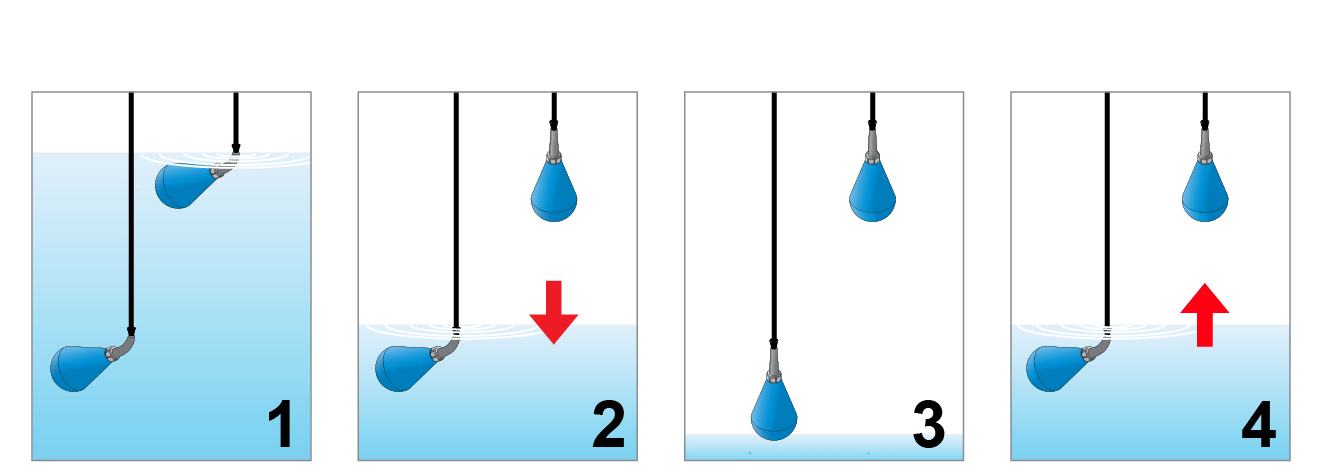
- Lower the float switch into the liquid chamber.
- Ensure the switch hangs freely without touching the walls, pump, or pipework.
- The Flygt ENM-10 is designed to hang immersed in liquid, preventing cable tangling and build-up of debris.
Step 3: Secure the Cable
- Use a cable holder or weight to keep the float switch at the correct depth.
- Ensure there is enough slack for the float to tilt freely as liquid levels change.
- Avoid sharp bends or tension on the cable to prevent premature wear.
Step 4: Electrical Connection
- Connect the float switch cable to the pump control panel or alarm system.
- Follow the wiring diagram provided by the manufacturer.
- Typically, the microswitch can be configured as normally open (NO) or normally closed (NC), depending on whether the pump needs to start when liquid rises or falls.
- Ensure all electrical work complies with local regulations and safety standards.
Step 5: Test the Operation
- Fill the tank or sump with water to the desired start level.
- Check if the float switch tilts and activates the pump.
- Allow the pump to run until the stop level is reached, confirming that the float switch resets correctly.
- Repeat the cycle to ensure reliable performance.
Common Installation Mistakes to Avoid
❌ Installing the float switch too close to the wall, where movement is restricted.
❌ Leaving the cable unsecured, which may cause tangling.
❌ Incorrect wiring, leading to pump running dry or failing to stop.
❌ Ignoring manufacturer recommendations for cable length or liquid density.
Maintenance Tips for Longer Service Life
- Inspect the cable and switch for signs of wear during routine pump maintenance.
- Clean the float switch if used in wastewater or sludge applications to prevent debris build-up.
- Replace worn cable holders or weights to maintain proper alignment.
- Always test the switch function after maintenance or pump servicing.
Conclusion
A properly installed float switch ensures your pumping system runs efficiently, protects equipment from damage, and prevents costly downtime. The Flygt ENM-10 float switch, supplied by Winston Engineering, offers long-lasting performance in wastewater, groundwater, and industrial applications.
📩 For professional advice or supply of float switches in Singapore, contact us at [email protected] or visit winstonengineering.com.

Author Bio
Andrew

Andrew is a seasoned marketing professional with over 14 years of experience at Winston Engineering, where he has grown from Marketing Executive to Marketing Manager. With a deep understanding of the industrial and engineering sector, he specialises in brand development, digital transformation, and content strategy. Andrew's expertise spans social media marketing, web content, advertising, and corporate events, making him a key voice in communicating Winston Engineering's solutions to audiences across the region.
See all posts by Andrew »